Social media logo sizes vary by platform, but most profile images are square (often displayed as a circle) and look best when uploaded at around 400 × 400 pixels or larger, while cover and header images use wide, platform-specific dimensions. The easiest way to get every size right is to start from a vector master of your logo and export transparent PNG versions for each platform. Platforms update their specs regularly, so check each one’s current help pages before a big launch.
Why Logo Size Matters on Social Media
A logo is your brand’s face, and it helps people connect a mark with your company even before they know its name. Today, a large share of that recognition happens on social media, where each platform crops and displays images differently. A logo that is not sized properly can look blurry or cut off, creating a poor impression with potential customers.
“A great trademark is appropriate, dynamic, distinctive, memorable, and unique.” – Primo Angeli
Logos now live in more places than ever: billboards, business cards, websites, profiles and posts. On each of them, your logo should stay consistent and recognizable, which is why it pays to plan logo sizes and dimensions early in the design process.
Logo Size and Dimension Basics
A logo often needs to be reoriented and resized for social media, websites, business cards, billboards, merchandise and printed ads. The core principles of logo design (versatility, scalability, proportion and balance) apply directly to sizing. Keep these practices in mind:
- The logo should be legible at every size.
- Sizing should be consistent across mediums.
- The logo should work however it is oriented and displayed.
- Vector files such as PDF, EPS and SVG scale perfectly, so use a vector version as the starting point for any resizing or reformatting.
Logo and Image Sizes for Social Platforms
Social platforms let a business present its brand and interact with many people, so your logo should look professional in every space: profile photo, cover, banners and posts. The dimensions below are commonly recommended figures; platforms change them from time to time, so treat them as a starting point and confirm current specs.

- Profile picture (personal and business pages): 180 × 180 px
- Image ads: 1200 × 628 px
- Image posts: 1200 × 630 px
- Cover image: 820 × 312 px
X (formerly Twitter)
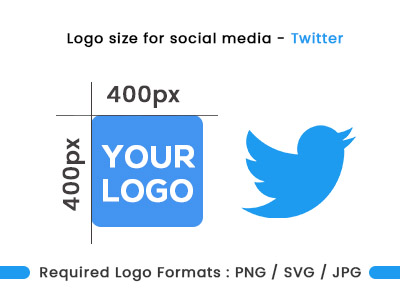
- Profile picture: 400 × 400 px
- Header image: 1500 × 500 px
- In-post images: commonly cited from about 440 × 220 px up to 1024 × 512 px

- Profile picture: displays at about 110 × 110 px (upload a larger square so it stays sharp)
- Thumbnails: 161 × 161 px
- Square post: 1080 × 1080 px
- Landscape post: 1080 × 566 px
- Portrait post: 1080 × 1350 px
- Stories: 1080 × 1920 px

YouTube
- Channel cover image: 2560 × 1440 px
- Profile image: 800 × 800 px
- Video thumbnail: 1280 × 720 px

- Profile image: 400 × 400 px
- Background image: 1584 × 396 px

- Profile image: 165 × 165 px
- Pin image: 1000 × 1500 px
If you want matching profile images, covers and post templates across every platform, a social media branding kit takes care of the sizing for you.
Logo Sizes for Your Website
A website must look polished and give customers the information they need, and the logo at the top of the page sets the brand impression. Once your logo is ready as a PNG with a transparent background, upload it to your site. A size of around 250 px wide by 100 px high works for many site headers, though the right size depends on your layout.
- Horizontal layouts: commonly 250 × 150 px, 350 × 75 px or 400 × 100 px
- Vertical (square) layouts: commonly 160 × 160 px
Logo Dimensions for Print
For print, the file format matters more than the pixel size. The best formats are vector files: PDF, EPS and SVG. A vector logo is easy to edit and keeps its quality when scaled up many times, which is essential for printing. With a vector file, you don’t need to worry about which size to bring to the print shop. If you must use a raster image, bigger is better: roughly 500 px or more for small print items and 1024 px or more for larger ones. See our guide to logo file formats for details.
Common standard sizes for print and merchandise include:
- US business cards: 3.5 × 2 inches (see our business card design service)
- Mug wrap print area: often about 8.5 × 3 inches
- Envelopes: C4 in Europe (22.9 × 32.4 cm) and the US #10 (4 1/8 × 9 1/2 inches)
- Letterheads: A4 (210 × 297 mm) or US Letter (8.5 × 11 inches)
- Coasters: typically 4 × 4 inches
Logo size for clothing
Many companies put their logo on t-shirts for publicity. For a large front graphic, around 11 to 13 inches wide is typical, depending on the shirt size. A sheet of letter paper is 11 inches on its long side, which gives a good sense of how large the graphic will look. Maximum print areas vary by printer and garment, so confirm with your print shop.
How Can I Resize My Logo?
- Use an image editor: Adobe Photoshop and similar programs let you change image and canvas size at any time. Starting from a vector master gives the cleanest result.
- Hire a designer: if you can’t resize the logo yourself, a graphic designer can prepare every version you need.
A logo has to look effective and stay legible at every size. If it loses definition and can’t fit envelopes, letterheads and small promotional items, it isn’t doing its job.
Need Help With Social Media Logo Sizes?
Logo Design Dallas can prepare your logo for social media profiles, covers and posts, and delivers final files in JPG, PNG, AI, EPS, PSD and PDF, with SVG on request. If your only copy of the logo is a small or blurry image, vector logo conversion can rebuild it at full quality. Call (214) 329-9133 to get help.
Frequently Asked Questions
What size should my logo be for social media profiles?
Most platforms use a square profile image, often shown as a circle. Commonly recommended upload sizes range from about 165 × 165 px to 800 × 800 px depending on the platform, so uploading a larger square such as 400 × 400 px or more keeps it sharp.
What is the best file format for a logo on social media?
A PNG with a transparent background, exported from a vector master file, works well for most social profiles and websites.
Do social media image sizes change?
Yes. Platforms update their recommended dimensions from time to time, so check each platform's current help pages before publishing.
What logo format should I use for printing?
Vector formats such as PDF, EPS and SVG are best for print because they keep their quality at any size.